

Issue: During the execution of a bot, the button options are not clearly visible and the menu item moves/transforms the position of menu item/list item.
In addition, transformed buttons do not come up on the screen.
This behavior breaks the execution of the flow.
When the bot clicks on “Filter Off” menu, the sub menu shows as below:
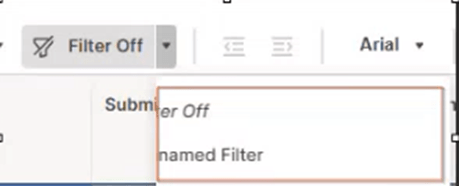
Expected Behavior:
The sub menu should show as below with tiny little icons.
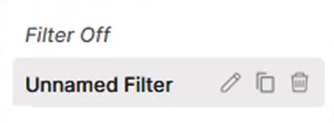
Current Bot Actions:
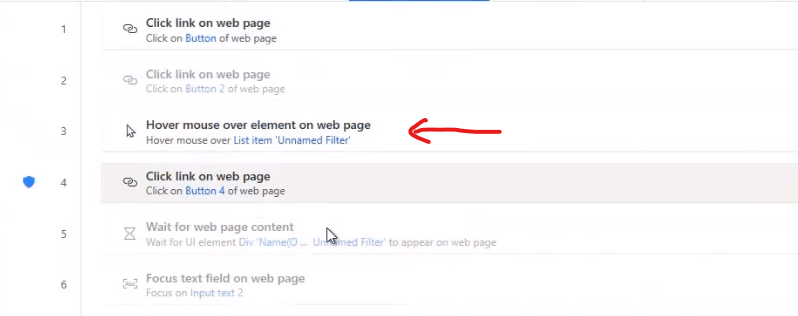
The red line in the above screen shot shows the problematic instruction which was not able to open up the sub menu items appropriately.
Resolution:
With the help of Microsoft personnel, it was found that the “Hover mouse over element on web page” was not able to provide sufficient click on the menu. It was recommended to use “Hover mouse over UI element in window” action.
Updated Bot Actions:
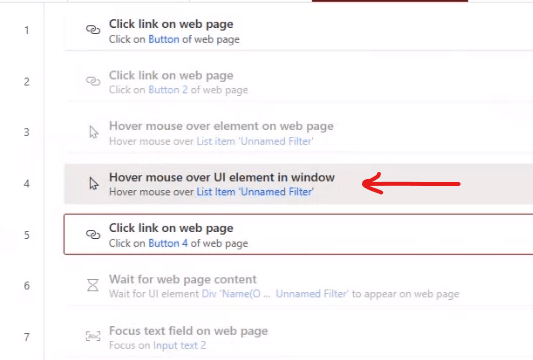
We performed following in the above script:
- Disabled the action “Hover mouse over element on web page”
- Add new action “Hover mouse over UI element in Window” and recaptured the UI element.
This fixed the issue
Note: Microsoft mentioned that they will add new action to hover element from web to do physical hover. This fix may go into Power Automate for Desktop in a month i.e.., Feb or March 2024.

Leave a comment