

Power Automate can be used to automate many repetitive tasks and also automate simple to complex business processes.
When a Power Automate (flow) executes, with the provided user interface, we can see all the details of the execution.
As the flow execution depends on its trigger and sometimes it is very hard to identify the appropriate execution instance from the flow execution history.
Power Automate provided workflow() function which return all the details about the workflow itself during run time.
How to use workflow() in the flow:
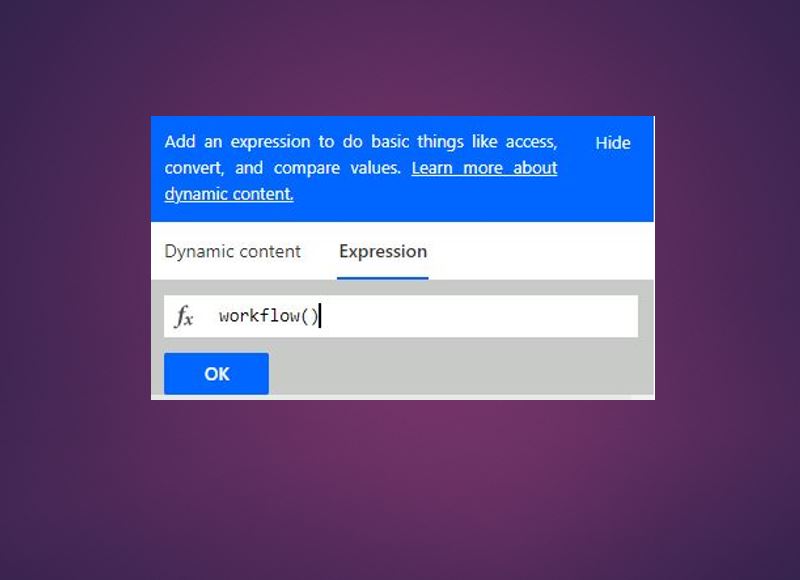
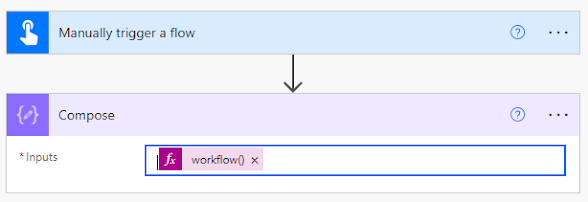
In the flow, drop a Compose action and click inside the Compose action. Now, you will see Dynamic window as below and select Expression tab. Type the function workflow() as below.

You will see as below:

Execution Details:
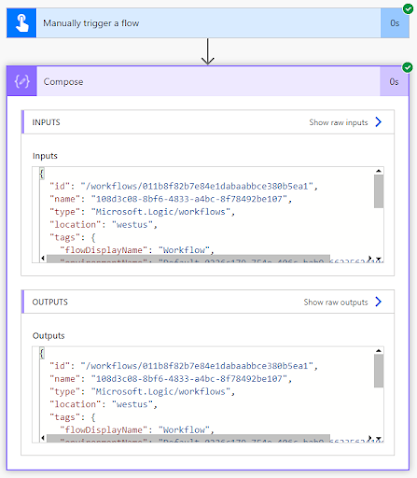
Outputs:{ “id”: “/workflows/011b8f82b7e84e1dabaabbce380b5ea1”, “name”: “108d3c08-8bf6-4833-a4bc-8f78492be107”, “type”: “Microsoft.Logic/workflows”, “location”: “westus”, “tags”: { “flowDisplayName”: “Test Workflow”, “environmentName”: “Default-0226c179-754e-406c-bab9-6623562410ef”, “logicAppName”: “108d3c08-8bf6-4833-a4bc-8f78492be107”, “environmentFlowSuspensionReason”: “Default:2D0226c179:2D754e:2D406c:2Dbab9:2D6623562410ef-None” }, “run”: { “id”: “/workflows/011b8f82b7e84e1dabaabbce380b5ea1/runs/08585573144318500695762427612CU139”, “name”: “08585573144318500695762427612CU139”, “type”: “Microsoft.Logic/workflows/runs” }}
Use case: Get Flow Run Nameworkflow().run.name
Use case: Execution Run Details
To get execution link to flow, use following in the compose action:
<a href=https://flow.microsoft.com/manage/environments/@{workflow()[‘tags’][‘environmentName’]}/flows/@{workflow()[‘name’]}/details>Open flow @{workflow()[‘tags’][‘flowDisplayName’]}</a>Reference:
For more information, visit documentation

Leave a comment